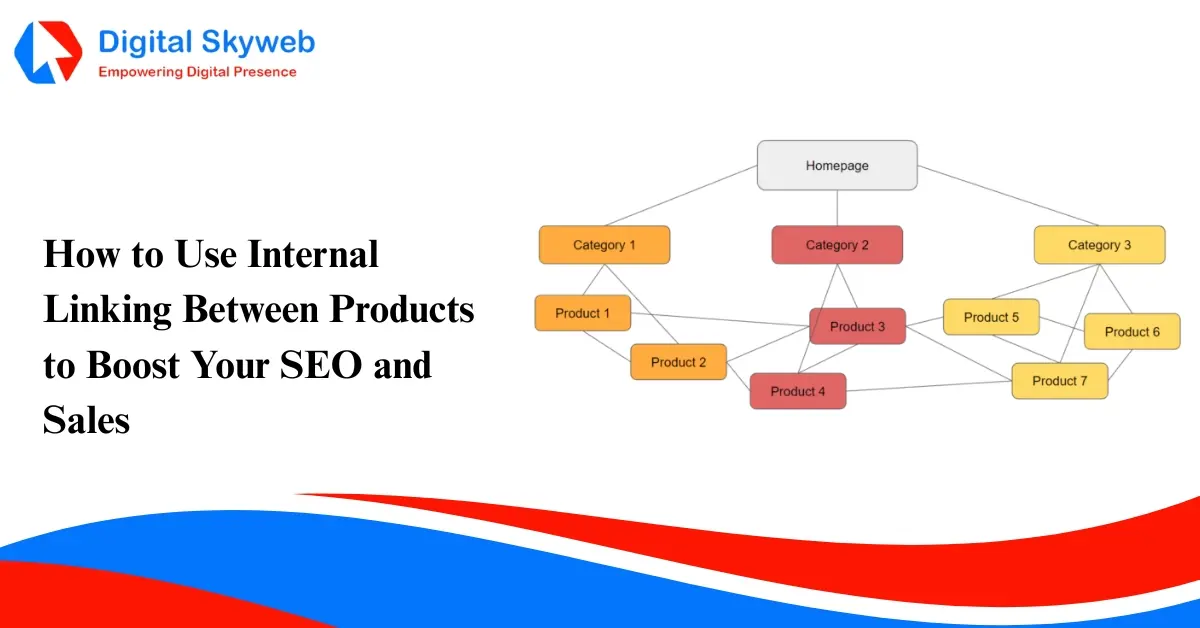
For those with an online retail website, you have likely heard how crucial internal linking is to your site’s overall SEO. Well, here’s the thing: most e-commerce sites are only thinking about linking posts or linking to their main category pages. What they are looking for is one of the best opportunities, which is linking between products.
In this article, I will take you through why product page internal linking is so important, how to implement it effectively, and a few great tips to help increase not only your rankings but also your sales!
Internal linking is the process of linking one page of your website to another through a hyperlink. When you link one product page to another, You are helping both users and search engines discover related products.
Think about it like this: you are guiding your shoppers through a smart method; they start at one product page that is linked to another complementary product.
Why You Should Use Internal Product Links
Crawlability Improvements:
Search engines such as Google leverage links to understand the structure of your site. When you link your products together, you make it easier for Google to discover more pages, which helps with indexing.
Page Authority Raises:
Internal links can actually pass link equity (SEO value) from your best product page to the newest product pages. In turn, this links your best product page directly to your newest product pages, which in theory could help them rank faster.
User Experience Improves:
Customers often purposefully look for related or complementary products, and when customers see something they also want, you turn the experience into a value-added one, making them spend more time on your site—another important engagement metric.
Conversions Increase:
Clever linking to services or products can lead to upselling and cross-selling opportunities, which helps increase your average order value.
How to Add Internal Links Between Products
Here are a few easy and effective ways to build internal product links:
Use “Related Products” or “You May Also Like” Sections
Add a related products widget under your main product description. This is one of the most common and user-friendly methods to interlink products.
For example:
Link Naturally in Product Descriptions
You can mention and link to other products within your product copy. Just make sure it feels natural.
Create Product Bundles or Collections
Build category-style pages or “bundles” that internally connect multiple products—like a Piercing Starter Kit that includes tools, jewelry, and aftercare. This not only helps SEO but also encourages bulk purchases.
Use Keyword-Rich Anchor Text
Instead of linking with “click here,” use descriptive anchor text like “16G titanium nose ring” or “gold cartilage clicker.” It gives search engines more context and improves your keyword relevance.
Update Older Product Pages Regularly
Every time you add new products, revisit older listings and insert internal links where relevant. This keeps your site fresh and interlinked in a way that search engines love.
How to Do Product Linking on WordPress
If your store runs on WordPress (WooCommerce), here’s how to optimize product interlinking:
- Use Related Products Plugin: Plugins like YITH WooCommerce Related Products or Related Products for WooCommerce let you set custom links between items.
- Manually Add Links: In your product description editor, highlight text and insert internal product URLs directly — simple and effective.
- Use Product Tags and Categories: Linking products within the same tag or category page helps build topic clusters that Google understands.
- Optimize with SEO Plugins: Tools like Yoast SEO or Rank Math can analyze your internal link structure and suggest improvements.
Pro tip: Add 2–3 contextual internal links per product page for best results.
How to Do Product Linking on Shopify
For Shopify users, internal linking is just as important — and surprisingly easy:
- Add “You May Also Like” Section: Most Shopify themes include this option. You can also use apps like Frequently Bought Together or Related Products & Upsells.
- Edit Product Descriptions: Insert internal links manually to relevant items using descriptive anchor text.
- Use Collections: Group products under collections like “New Arrivals,” “Best Sellers” .These pages automatically connect products internally.
- Blog Linking: If you run a blog on Shopify, link directly to product pages within your articles for additional SEO power.
Pro tip: Keep your URLs clean and keyword-friendly, like /products/titanium-clicker-ring instead of long strings.
SEO Tips for Product-to-Product Linking
- Avoid over-linking—2 to 4 internal links per product page are enough.
- Link to high-performing pages from new or less visible ones.
- Track with Google Search Console which product URLs are getting indexed and linked often.
- Maintain relevance—only link products that make sense together.
Remember: Google values contextual linking—it should feel like a genuine recommendation, not a forced SEO trick.
Summary: Internal linking between products is one of those small SEO tweaks that have a giant impact. It improves crawl ability, distributes the link equity, and most importantly, it leads customers to products that they may actually purchase.
Start with your top-selling and recently added products so you have a foundation for the product flows to link together. Hopefully, you’ll identify natural product connections and discover ways to link in a smart way. In time, you should have improved search visibility, improved user navigation flows, and conversions.