When people talk about SEO, they often turn to keywords, backlinks, or content optimization.
But there is one powerful SEO technique that is often forgotten – internal linking. It’s simple, free, and something you can start improving today without any technical knowledge.
Problem?
Many website owners and bloggers don’t know how to use internal links naturally. They either add too many links, add links that don’t make sense, or ignore internal linking altogether.
This guide will show you how to do internal linking in a natural, clean, and human-friendly way – without keyword stuffing, without spammy tactics, and without harming the reader’s experience.By the end, you’ll know:
- What internal links really are
- Why they matter for SEO and user experience
- How to place them naturally in your content
- How to choose the right anchor text
- How to avoid over-optimization
- How to create a strong content structure
- How to audit and improve your internal links over time
Let’s dive in.
What Are Internal Links?
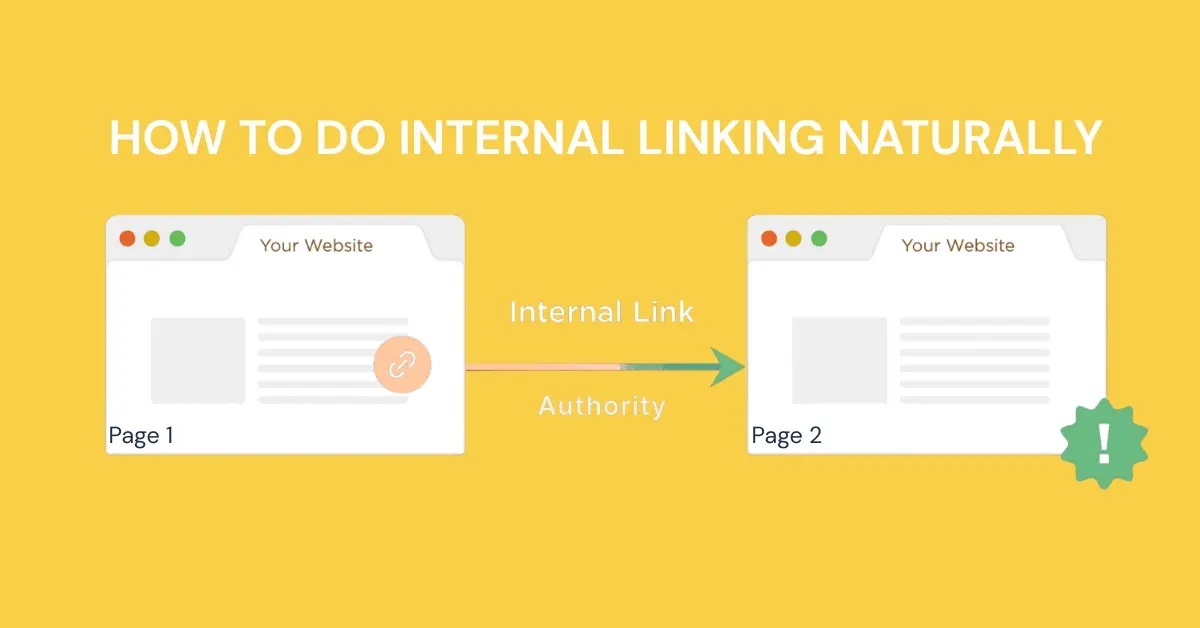
Internal links are hyperlinks that connect one page on your website to another page on the same domain. They help users navigate your site easily and guide search engines to understand your content structure.

For example:
- A blog post linking to another blog post
- A service page linking to a pricing page
- A homepage linking to a category or subcategory page
internal links create a strong content network that improves SEO.
Internal Links vs External Links
- Internal links: Connect pages on your own website
- External links: Connect your website to another website
Both matter, but internal links are 100% in your control — and they are one of the easiest ways to improve your SEO right now.
Why Internal Linking Matters
Internal linking may seem simple, but it plays a powerful role in how search engines and users experience your website. When done naturally, it can boost rankings, improve navigation and strengthen your authority online.
Helps Google Discover and Index Your Pages
Google finds new pages by crawling links. When your pages are linked through internal links, search bots can easily jump from one page to another. This ensures that your important pages are searched, crawled and indexed faster. Without internal links, some pages may remain hidden or take longer to appear in search results.

Passes Authority (PageRank) Across Your Website
Every page on your site has some level of authority. Internal links help distribute that authority to other pages. For example, if a high-performing blog links to a new article, it shifts some of its PageRank, helping the new page rank better. This makes internal linking a powerful way to strengthen your weak or new pages.
Improves User Experience
Good internal linking makes your website easier to navigate. When visitors find relevant information quickly, they stay longer and engage more with your content. Guiding users through useful links reduces frustration, lowers bounce rates and increases the likelihood of conversion – whether it’s a sale, sign-up or inquiry.

Builds Topical Authority
Topical authority comes from showing Google that you cover a topic in depth. When your articles, guides, and service pages link to each other, you create a strong content cluster. This signals expertise, helping you rank higher for related keywords and compete better in your niche.
Why “Natural” Internal Linking Is So Important
Google loves natural content.
Readers love natural content.
If your links feel forced, spammy, or out of place, it sends the wrong signals.
Natural internal linking means:
- Links fit the context
- Links help the reader
- Anchor text flows smoothly
- Links aren’t stuffed for SEO
- You only add links when they add value
This improves both trust and rankings.
How to Do Internal Linking Naturally
Internal linking works best when it feels helpful, human, and intuitive. Rather than forcing links for the sake of SEO, you should weave them into your content in a way that guides readers, improves clarity, and strengthens your site structure. Here’s how to do it naturally and effectively.

Start With Relevance: Only Link When It Helps the Reader
The most important rule is simple: link only if it really helps the reader. If a page provides more depth, explains a related idea, or answers a question, it’s a good place to add a link. Avoid linking just because you feel you “should.” Irrelevant links break trust and disrupt the reading flow.
Example of natural relevance:
“If you want to build stronger SEO foundations, start with creating topic clusters that organize your content clearly.”
Here, linking “topic clusters” to a related post makes perfect sense.
Use Natural, Descriptive Anchor Text
Anchor text should blend seamlessly with your writing. It requires a description of the page you are linking to without any pressure. Instead of stuffing keywords, use phrases that readers naturally expect. If your content is clear and conversational, your anchor text will be too.

Good examples:
- “learn how to do keyword research”
- “see our complete on-page SEO checklist”
- “read the guide to improving website speed”
Bad examples:
- Click here
- Read this article
- More info
The best anchor text blends into the sentence and feels natural.
Avoid Over-Optimized, Exact Match Anchor Text
Google can easily detect when anchor text is overly optimized. If every link says the exact keyword you want to rank for, it looks unnatural. Let your language flow. If a partial keyword appears naturally, that’s fine—but don’t force it.
Instead of repeating:
- “best SEO tools”
- “best SEO tools”
- “best SEO tools”
Use variations like:
- “SEO tools you should consider”
- “recommended tools for SEO beginners”
- “our list of helpful SEO software”
Variations keep your content more human and more natural.
Add Internal Links Where They Fit Naturally in the Sentence
The best internal links appear when a reader wants more information. If you mention something you’ve explained in another article, that’s an ideal place to link. It should feel like it’s giving a useful suggestion, not some SEO trick.
Example of Forced Internal Link
“Our email marketing guide CLICK HERE teaches you everything.”
This looks unnatural and unprofessional.
Example of Natural Internal Link
“If you’re just starting, this beginner-friendly email marketing guide will help you understand the basics.”
Smooth. Natural. Helpful.
Link From High-Authority Pages to New or Important Pages
Some pages on your site naturally have more authority—maybe they get more backlinks or traffic. These pages can gain valuable PageRank to new or more important pages. Linking strategically helps promote pages that need visibility without manipulating anything unnatural.
Identify your high-authority pages:
- Pages with high traffic
- Pages with backlinks
- Pillar pages or guides
- Homepage or category pages
Linking from these powerful pages gives a huge SEO boost to your new or low-visibility content.
Build Topic Clusters for Natural Linking
Topic groups naturally encourage internal engagement. When you create multiple posts on a topic, you’ll have plenty of opportunities to link between them. This not only helps readers locate a topic but also signals to Google that your site covers it in depth.

A topic cluster looks like:
- Main Pillar Page (broad topic)
- Supporting Articles (subtopics)
- Internal links connecting all pages naturally
For example:
- Pillar: “Complete Guide to SEO”
- Cluster pages: Keyword research, link building, on-page SEO, technical SEO
- All pages link to each other in a natural flow
This improves:
- Relevance
- Topical authority
- User navigation
- Crawlability
Google loves well-structured websites.
Add Internal Links Early in the Content
Adding a useful link near the top of your content not only helps readers, it also helps search engines. Google crawls from the top down, so linking early makes it easier for bots to find important pages quickly.
Links placed higher in the article tend to:
- Get more clicks
- Be seen by Google earlier
- Be given more importance
But don’t force it. If a natural linking opportunity appears in the second paragraph, use it there.
Don’t Add Too Many Internal Links
Too many links can make your content look cluttered or spammy. It also distracts readers and weakens authority. Focus on quality over quantity. A few well-placed, meaningful links provide far more value than dozens of random links.
Keep your links:
- Purposeful
- Relevant
- Balanced
A good guideline:
- Blog posts: 3–8 natural internal links
- Long guides: up to 10–15 if relevant
- Short pages: 1–3 links
Link New Content to Old — and Old Content to New
Many people forget this, but internal linking should work in both directions. When publishing new content, link it to older relevant posts. Then revisit your older content and add links pointing to the new one. This creates a healthy flow of authority and keeps your site structure updated.
Use Clean “Dofollow” Internal Links
Make sure that your internal links are dofollow so search engines can follow them and pass authority. Avoid unnecessary attributes or complicated URL structures. Clean, readable links are best for both humans and search engines.
Only use “nofollow” in rare cases, like:
- Login pages
- Thank you pages
- Useless pages
- Pages with duplicate content
All other internal links should pass authority.
Use Contextual Links Instead of Just Menu Links
Menu links and sidebar navigation are useful but not enough. Google puts more value on contextual links—those placed naturally within paragraphs—because they show real relationships between pages. These links help build topical authority and guide users more effectively.
- They give Google context
- They are surrounded by relevant text
- They appear naturally
- They help readers continue their journey
A contextual link is always more powerful than a sidebar or footer link.
Audit Your Internal Links Regularly
Internal linking is not a one-time task. Over time, pages get updated, URLs change, and new content is added. Regular audits help you identify broken links, missed linking opportunities, and outdated structure. Keeping your internal links healthy improves SEO and ensures a smooth experience for every visitor.
Common Internal Linking Mistakes to Avoid
To keep your linking natural and safe, avoid these mistakes:
- Linking irrelevant pages just for SEO – Readers hate it, and Google notices it.
- Using the same anchor text every time – Variety is essential.
- Adding too many links in one paragraph – It looks spammy and annoying.
- Linking every page to every other page – This destroys your site structure.
- Overdo plugins or automation tools – Auto-links often look unnatural and repetitive.
- Not updating old links – Outdated links hurt SEO and user experience.
A Simple Checklist for Natural Internal Linking
Before publishing any page, ask:
- Is the link relevant to the topic?
- Does it help the reader?
- Does the anchor text feel natural?
- Is it descriptive and meaningful?
- Is there variety in anchor text?
- Is the link placed naturally in the sentence?
- Have I avoided too many links?
- Did I link to older posts?
- Should older posts link to this new one?
- Are all links working properly?
If the answer is yes — you’re doing internal linking the right way.
Summary
Internal linking doesn’t require tools, tricks, or technical skills.
It simply requires you to think like a reader.
Ask:
- What would help the reader learn more?
- What page naturally relates to this topic?
- Which content deserves more visibility?
When you follow natural logic, you automatically follow Google’s logic.
Internal linking is one of the easiest ways to:
- Boost rankings
- Improve user experience
- Strengthen topical authority
- Increase page views
- Speed up indexing
Start small. Add meaningful links. Stay relevant.
Your SEO will improve naturally — without forcing anything.